> ## Documentation Index
> Fetch the complete documentation index at: https://statsig-4b2ff144-kill-dead-node-pages.mintlify.site/llms.txt
> Use this file to discover all available pages before exploring further.

# Integrating Sidecar with GTM for tracking

> Set up Google Tag Manager integration with Sidecar to automatically send GTM-tagged events to Statsig for experiment tracking.

<Info>
  This integration is for tracking purposes only. We strongly advise against loading Sidecar itself via GTM, as this will delay the changes from being applied and result in "flickering".
</Info>

### Overview

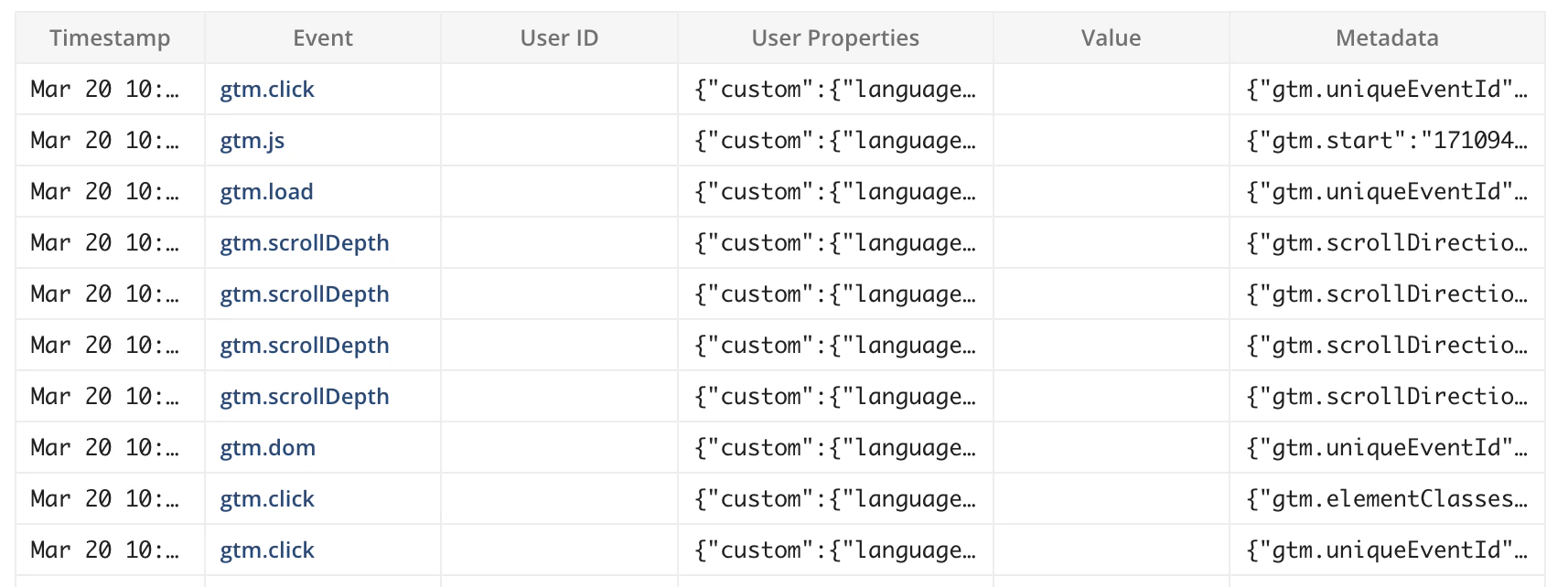
This integration with GTM will automatically send any GTM-tagged events to Statsig.<br /> No additional coding or tagging is required after completing these steps.
<Frame>
  <img src="https://mintcdn.com/statsig-4b2ff144-kill-dead-node-pages/NBZ6l0nQH5QxgVoi/images/gtm-logstream.png?fit=max&auto=format&n=NBZ6l0nQH5QxgVoi&q=85&s=414bc6856ddd1d81f74b28dc56320b04" alt="Statsig logstream showing GTM events flowing in" width="1714" height="642" data-path="images/gtm-logstream.png" />
</Frame>

*(statsig logstream showing gtm events flowing in)*

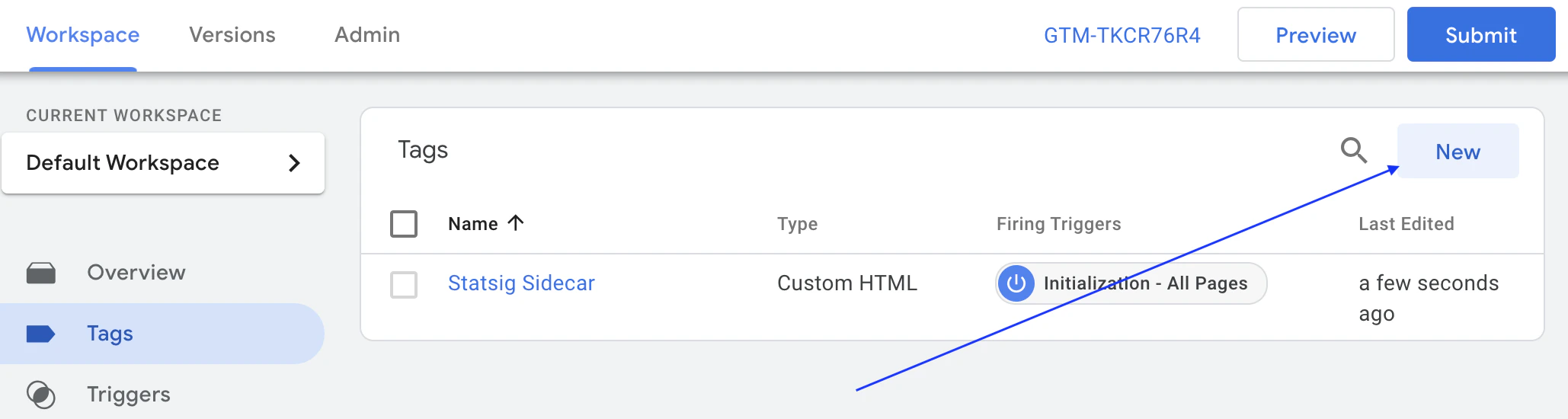
### Step 1: Create new tag
<Frame>
  <img src="https://mintcdn.com/statsig-4b2ff144-kill-dead-node-pages/NBZ6l0nQH5QxgVoi/images/gtm-create-tag.png?fit=max&auto=format&n=NBZ6l0nQH5QxgVoi&q=85&s=4fa2618e2e808757768e75582b7cefad" alt="GTM create new tag interface for Statsig integration" width="2058" height="550" data-path="images/gtm-create-tag.png" />
</Frame>

### Step 2: Choose tag type

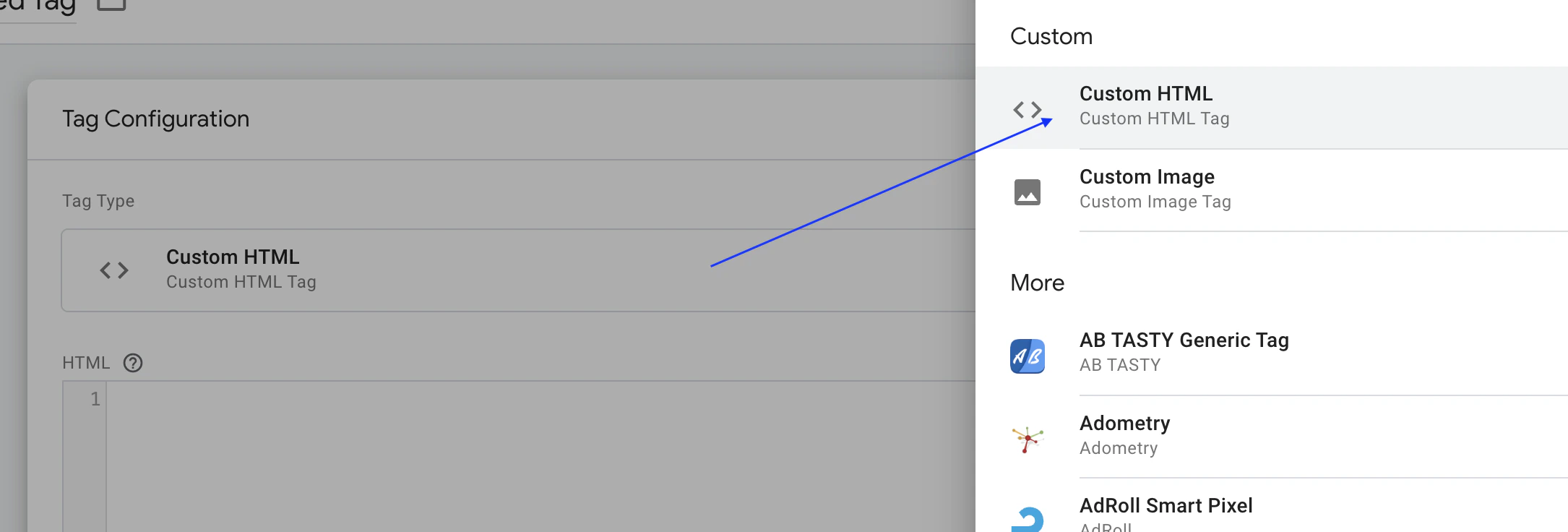
Choose "Custom HTML" for tag type, and paste [this GTM code](#gtm-code) (including script tag)
<Frame>
  <img src="https://mintcdn.com/statsig-4b2ff144-kill-dead-node-pages/NBZ6l0nQH5QxgVoi/images/gtm-tag-configuration.png?fit=max&auto=format&n=NBZ6l0nQH5QxgVoi&q=85&s=66ddd02576c2c5657fde830f8acbc6b6" alt="GTM tag configuration screen with custom HTML setup" width="2170" height="736" data-path="images/gtm-tag-configuration.png" />
</Frame>

### Step 3: Adjust fire options

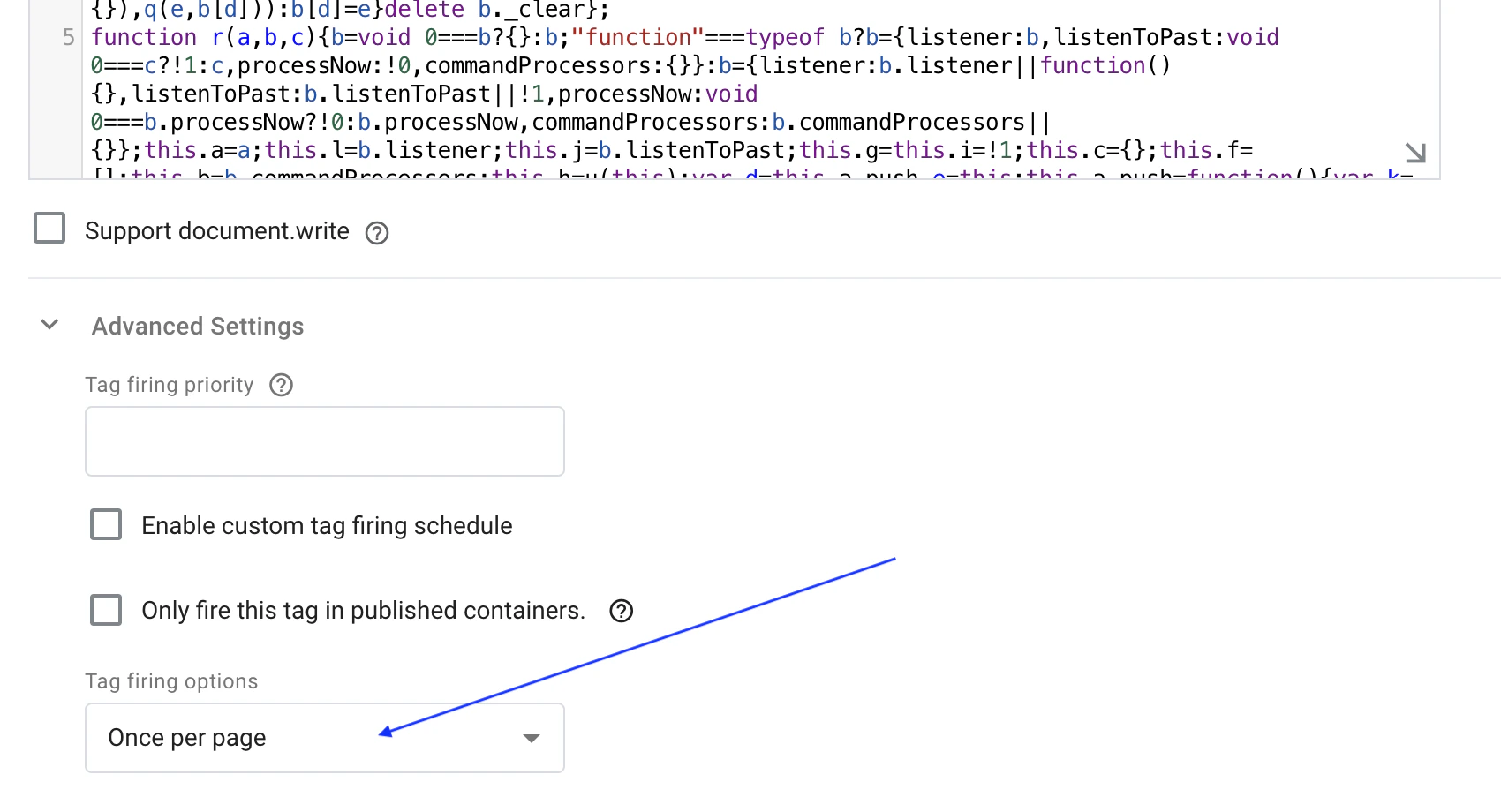
Under Advanced Settings under "Tag Firing options", select "Once per page"
<Frame>
  <img src="https://mintcdn.com/statsig-4b2ff144-kill-dead-node-pages/NBZ6l0nQH5QxgVoi/images/gtm-create-tag-options.png?fit=max&auto=format&n=NBZ6l0nQH5QxgVoi&q=85&s=6ef33e23d450d26f5e334e70e9d86824" alt="GTM tag firing options settings for once per page" width="1700" height="920" data-path="images/gtm-create-tag-options.png" />
</Frame>

### Step 4: Set Tag Trigger

Below the "Tag Configuration" section, set the Trigger to "Initialization - All Pages" Option.
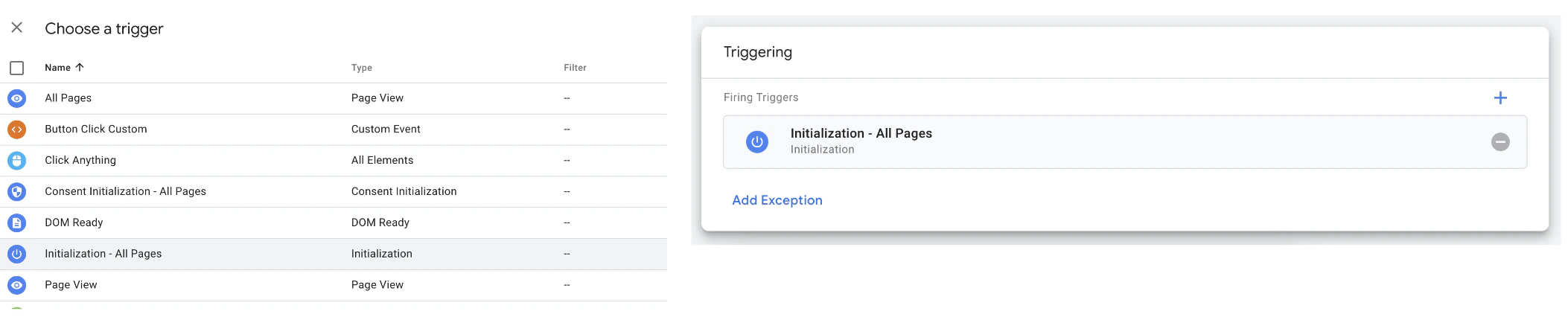
<Frame>
  <img src="https://mintcdn.com/statsig-4b2ff144-kill-dead-node-pages/NBZ6l0nQH5QxgVoi/images/gtm-tag-trigger.png?fit=max&auto=format&n=NBZ6l0nQH5QxgVoi&q=85&s=628d091458bd380a89f52e47658353f5" alt="GTM tag trigger configuration for all pages initialization" width="2106" height="430" data-path="images/gtm-tag-trigger.png" />
</Frame>

### Step 5: Save tag and test

After saving the tag, and publishing your updated GTM tag, tracking will be done automatically without any additional configuration.
To debug the integration, you can set a local storage entry `debug_ss_gtm` with any value on your webpage. Now, you'll console log statements for each tracking call being dispatched to Statsig. You can also inspect your browser's network traffic to see events being tracked.

### GTM Code

```html theme={null}
<script type="text/javascript">
/* dataLayer helper */
(function(){
  var f=/\[object (Boolean|Number|String|Function|Array|Date|RegExp|Arguments)\]/;function g(a){return null==a?String(a):(a=f.exec(Object.prototype.toString.call(Object(a))))?a[1].toLowerCase():"object"}function m(a,b){return Object.prototype.hasOwnProperty.call(Object(a),b)}function n(a){if(!a||"object"!=g(a)||a.nodeType||a==a.window)return!1;try{if(a.constructor&&!m(a,"constructor")&&!m(a.constructor.prototype,"isPrototypeOf"))return!1}catch(c){return!1}for(var b in a);return void 0===b||m(a,b)};function p(a,b){var c={},d=c;a=a.split(".");for(var e=0;e<a.length-1;e++)d=d[a[e]]={};d[a[a.length-1]]=b;return c}function q(a,b){var c=!a._clear,d;for(d in a)if(m(a,d)){var e=a[d];"array"===g(e)&&c?("array"===g(b[d])||(b[d]=[]),q(e,b[d])):n(e)&&c?(n(b[d])||(b[d]={}),q(e,b[d])):b[d]=e}delete b._clear};
  function r(a,b,c){b=void 0===b?{}:b;"function"===typeof b?b={listener:b,listenToPast:void 0===c?!1:c,processNow:!0,commandProcessors:{}}:b={listener:b.listener||function(){},listenToPast:b.listenToPast||!1,processNow:void 0===b.processNow?!0:b.processNow,commandProcessors:b.commandProcessors||{}};this.a=a;this.l=b.listener;this.j=b.listenToPast;this.g=this.i=!1;this.c={};this.f=[];this.b=b.commandProcessors;this.h=u(this);var d=this.a.push,e=this;this.a.push=function(){var k=[].slice.call(arguments,
  0),l=d.apply(e.a,k);v(e,k);return l};b.processNow&&this.process()}r.prototype.process=function(){this.registerProcessor("set",function(){var c={};1===arguments.length&&"object"===g(arguments[0])?c=arguments[0]:2===arguments.length&&"string"===g(arguments[0])&&(c=p(arguments[0],arguments[1]));return c});this.i=!0;for(var a=this.a.length,b=0;b<a;b++)v(this,[this.a[b]],!this.j)};r.prototype.get=function(a){var b=this.c;a=a.split(".");for(var c=0;c<a.length;c++){if(void 0===b[a[c]])return;b=b[a[c]]}return b};
  r.prototype.flatten=function(){this.a.splice(0,this.a.length);this.a[0]={};q(this.c,this.a[0])};r.prototype.registerProcessor=function(a,b){a in this.b||(this.b[a]=[]);this.b[a].push(b)};
  function v(a,b,c){c=void 0===c?!1:c;if(a.i&&(a.f.push.apply(a.f,b),!a.g))for(;0<a.f.length;){b=a.f.shift();if("array"===g(b))a:{var d=a.c;g(b[0]);for(var e=b[0].split("."),k=e.pop(),l=b.slice(1),h=0;h<e.length;h++){if(void 0===d[e[h]])break a;d=d[e[h]]}try{d[k].apply(d,l)}catch(w){}}else if("arguments"===g(b)){e=a;k=[];l=b[0];if(e.b[l])for(d=e.b[l].length,h=0;h<d;h++)k.push(e.b[l][h].apply(e.h,[].slice.call(b,1)));a.f.push.apply(a.f,k)}else if("function"==typeof b)try{b.call(a.h)}catch(w){}else if(n(b))for(var t in b)q(p(t,
  b[t]),a.c);else continue;c||(a.g=!0,a.l(a.c,b),a.g=!1)}}r.prototype.registerProcessor=r.prototype.registerProcessor;r.prototype.flatten=r.prototype.flatten;r.prototype.get=r.prototype.get;r.prototype.process=r.prototype.process;window.DataLayerHelper=r;function u(a){return{set:function(b,c){q(p(b,c),a.c)},get:function(b){return a.get(b)}}};})(); 

window.StatsigLogger = (function () {

  var statsigInstance, log = function () {
    if (typeof localStorage !== 'undefined' && typeof console !== 'undefined' && localStorage.getItem('debug_ss_gtm')) {
      console.log.apply(console, arguments);
    }
  };

  var checkStatsigReady = function (callback) {
    // statsig has already loaded
    if(typeof StatsigSidecar !== 'undefined' && StatsigSidecar.getStatsigInstance()) {
      log('+++ Statsig:ready Already loaded');
      callback(StatsigSidecar.getStatsigInstance());
    }
    else {
      log('+++ Statsig:ready callback');
      window.postExperimentCallback = function(statsigClient, expIds) {
        callback(statsigClient);
      }
    }
  };

  var handleGTMMessage = function (model, message) {    
    if (typeof message === 'object' && typeof message.event === 'string') {
      var metadata = {};
      for (var prop in message) {
        if(!(message[prop] instanceof HTMLElement) && typeof(message[prop]) !== 'object') {
          metadata[prop] = message[prop];
        }
      }
      log('++ handleGTMMessage', message.event, message.conversionValue || null, metadata);
      statsigInstance.logEvent(message.event, message.conversionValue || null, metadata);
    }
    else {
      log('++ handleGTMMessage / skip');
    }
  }

  checkStatsigReady(function (statsigInstanceReady) {
    statsigInstance = statsigInstanceReady;
    // dataLayer will contain gtm events (~messages) that were fired pre statsig readiness
    new DataLayerHelper(dataLayer, {
      listener: handleGTMMessage,
      listenToPast: true,
    });
  });
  
  return {
    track: function() {
      try {
        statsigInstance.logEvent.apply(statsigInstance, arguments);
      } catch(err) { } 
    }
  }

})();
</script>
```
