> ## Documentation Index
> Fetch the complete documentation index at: https://statsig-4b2ff144-kill-dead-node-pages.mintlify.site/llms.txt
> Use this file to discover all available pages before exploring further.
# Clickhouse Connection [Beta]
Statsig's Clickhouse connector is in open Beta: some functionality may not be performance-optimized or may have minor syntax errors during the beta period.
Please reach out to support for assistance getting started with Clickhouse on Statsig.
## Overview
To set up connection with Clickhouse, we need the following:
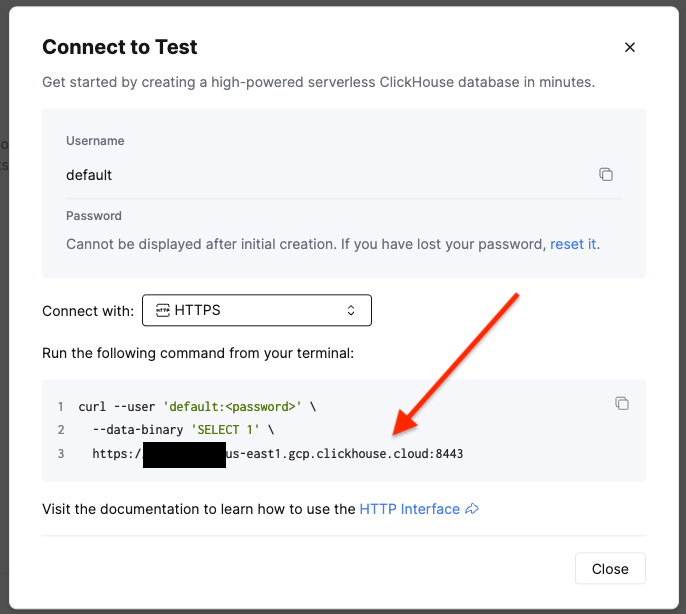
* The URL to connect to, e.g. https\://\.us-east1.gcp.clickhouse.cloud:8443
* This can be found by going to the service that needs to be connect to, and clicking "Connect" in the left rail
* A database in the service where Statsig will have full CRUD access for writing logged data and intermediate tables
* Statsig recommends that this is a new database, separate from production data
* A username/password for a Statsig database user
* Statsig recommends making a new, standalone user for audit purposes
* An exposures table to export exposures data logged to Statsig
* An events table to export events data logged to Statsig
 To create a user, the easiest way is to run:
```sql theme={null}
create user IDENTIFIED WITH sha256_password BY '';
```
But the correct approach will depend on the best practices specified by your database administrator.
## Grant Permissions to Statsig's Account
The database user created for Statsig will need database permissions in order to access data and run workflows.
Statsig requires two levels of permission:
* Read-only access to any production data (outside of the data logged to Statsig) that will be analyzed in analytics or experimentation
* Full CRUD access within the staging database (specified above) where Statsig will write data artifacts to store results for long-running experiments
This can be granted to the Statsig user in SQL by an account with sufficient permissions.
Read:
```sql theme={null}
GRANT SHOW TABLES, SHOW COLUMNS, SELECT ON .* to ;
```
CRUD:
```sql theme={null}
GRANT SHOW TABLES, SHOW COLUMNS, SELECT ON .* to ;
GRANT CREATE, DROP, DELETE, ALTER, UPDATE, INSERT ON .* to ;
```
### What IP addresses will Statsig access data warehouses from?
[See FAQ](/data-warehouse-ingestion/faq#what-ip-addresses-will-statsig-access-data-warehouses-from)
To create a user, the easiest way is to run:
```sql theme={null}
create user IDENTIFIED WITH sha256_password BY '';
```
But the correct approach will depend on the best practices specified by your database administrator.
## Grant Permissions to Statsig's Account
The database user created for Statsig will need database permissions in order to access data and run workflows.
Statsig requires two levels of permission:
* Read-only access to any production data (outside of the data logged to Statsig) that will be analyzed in analytics or experimentation
* Full CRUD access within the staging database (specified above) where Statsig will write data artifacts to store results for long-running experiments
This can be granted to the Statsig user in SQL by an account with sufficient permissions.
Read:
```sql theme={null}
GRANT SHOW TABLES, SHOW COLUMNS, SELECT ON .* to ;
```
CRUD:
```sql theme={null}
GRANT SHOW TABLES, SHOW COLUMNS, SELECT ON .* to ;
GRANT CREATE, DROP, DELETE, ALTER, UPDATE, INSERT ON .* to ;
```
### What IP addresses will Statsig access data warehouses from?
[See FAQ](/data-warehouse-ingestion/faq#what-ip-addresses-will-statsig-access-data-warehouses-from)